Configuring VCF Operations 9 Capacity Calculations to Consider 90 Days of Usage

As a solutions architect managing a VCF 9 Operations instance, one of the first things I tune after initial deployment is the capacity engine. Out of the box, VCF Operations uses an exponential decay model that heavily weights the most recent data points. That is great for catching sudden spikes, but it can misrepresent your true capacity posture if your environment has cyclical workloads — think month-end batch jobs, quarterly reporting bursts, or seasonal traffic patterns. ...
March 30, 2026 · 7 min · Cosmin

Unstuck Your VCF Lab: A Script to Bypass Compatibility & Interoperability Checks

If you spend enough time building out VMware Cloud Foundation (VCF) in a lab, Proof of Concept, or nested environment, you will eventually hit “The Wall.” You know the hardware works. You know the ESXi versions will play nicely together. But SDDC Manager’s automated guardrails, the strict Hardware Compatibility List (HCL) checks and VVS (VMware Validated Solutions) interoperability validations throw up a red flag and stop your deployment or upgrade dead in its tracks. ...

February 9, 2026 · 4 min · Cosmin
Article cover image

Upgrading VCF 9.0 SDDC Manager to 9.0.1: A Step-by-Step Guide

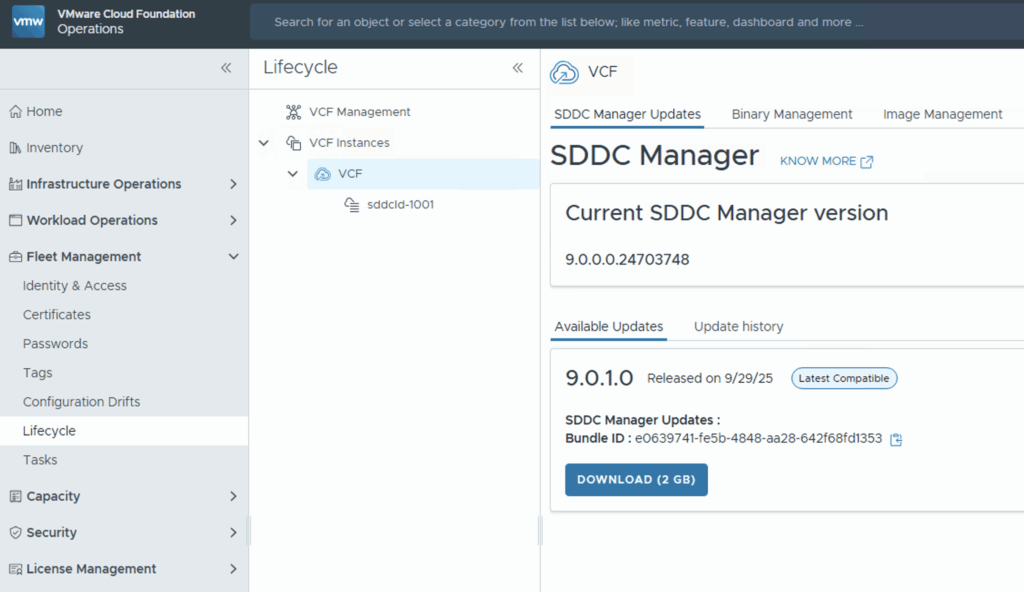
Upgrading your SDDC Manager from version 9.0 to 9.0.1 is a relatively straightforward process when done through the integrated Lifecycle interface. Below is a guide to go over this patch upgrade. 1. Navigate to the Update Section Log into Operations → Fleet Management. Under Lifecycle → VCF Instances, select the VCF instance you want to upgrade. Look for the available update section. If you see SDDC Manager Update 9.0.1, click the Download icon. If no update appears, double-check your depot configuration and ensure your binary repositories are correctly set up. ...

October 9, 2025 · 1 min · Cosmin
Article cover image

Upgrading VCF 9.0.0 Fleet Management to 9.0.1: A Step-by-Step Guide

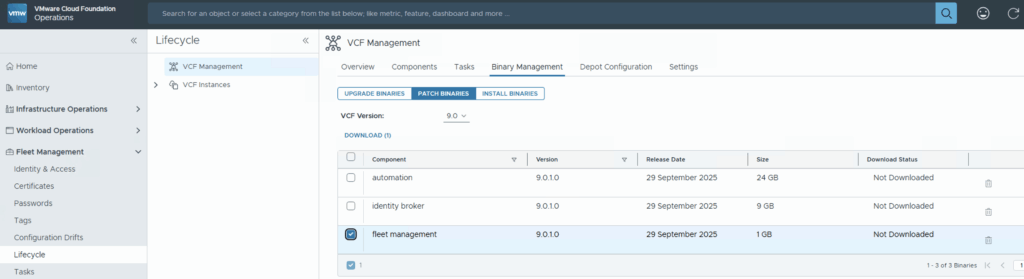
Upgrading your VCF Fleet Management from version 9.0.0 to 9.0.1 is a relatively modest patch update, but careful execution ensures minimal disruption. Below is a step-by-step guide to walk you through the process safely. Download the Patch Download the patch by going to Fleet Management -> Binary Management -> Patch Binaries -> Select fleet management -> Download. Upload & Stage the Patch Once the download is complete go to Settings -> System Patches -> New Patch ...

October 9, 2025 · 1 min · Cosmin

Fixing “PostgreSQL won’t start after reboot” on VCF Operations Fleet Management 9.0.1 — and automating it

When upgrading the VCF Operations Fleet Management appliance to 9.0.1, you might hit a reboot surprise: vPostgres fails to start, and the fleet-management certificate is regenerated. You’ll see journal errors like: pg_ctl: could not open PID file "/var/vmware/vpostgres/current/pgdata/postmaster.pid": Permission denied systemd[1]: vpostgres.service: Control process exited, code=exited, status=1/FAILURE Broadcom’s KB confirms the symptoms and provides the manual steps to fix permissions on the Postgres data dir and to normalize the regenerated cert/key filenames, followed by service restarts. (manual steps) Fix pgdata permissions chmod 700 /var/vmware/vpostgres/current/pgdata/ Normalize the regenerated certificate & key in /opt/vmware/vlcm/cert by renaming the timestamped server.crt.* / server.key.* back to server.crt / server.key, then restart services (nginx, vrlcm-server.service) and verify status/logs. One-shot automated remediation (idempotent) Run this as root on the Fleet Management appliance (e.g., via SSH). It: ...

September 30, 2025 · 4 min · Cosmin
Article cover image

Suppress ESXi Host Alerts in VCF Operations 9 When a Host Enters Maintenance Mode

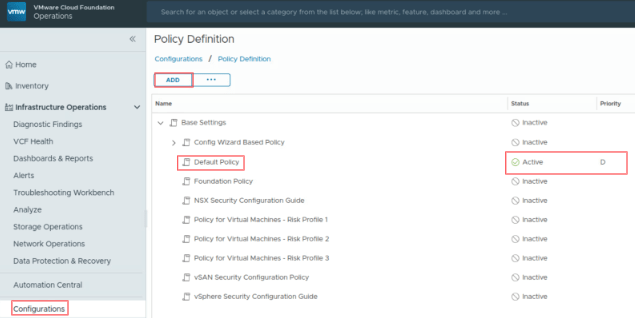
When a vSphere admin places an ESXi host in vCenter maintenance mode, VCF Operations should automatically suppress host alerts for that object, without pausing metric collection, and then restore alerting when maintenance ends. Why this approach? In VCF 9, you can avoid alert noise during maintenance in two ways: Maintenance Schedules – pause both collection and alerts during a defined window (best for planned maintenance). Policy-based alert suppression (this post) – keep metrics flowing but disable host alert definitions while the host is in maintenance. This is done with a policy attached to a dynamic custom group keyed to the host’s Maintenance Mode property. Note on naming: In VCF 9, VCF Operations is the successor to Aria/vRealize Operations and is part of the unified Cloud Foundation experience. If you’re upgrading from Aria Operations, see Broadcom’s “Upgrade to VCF Operations 9.0.” ...

July 30, 2025 · 3 min · Cosmin
Article cover image

Applying VMware Aria Suite Lifecycle Manager 8.18 Patch 2

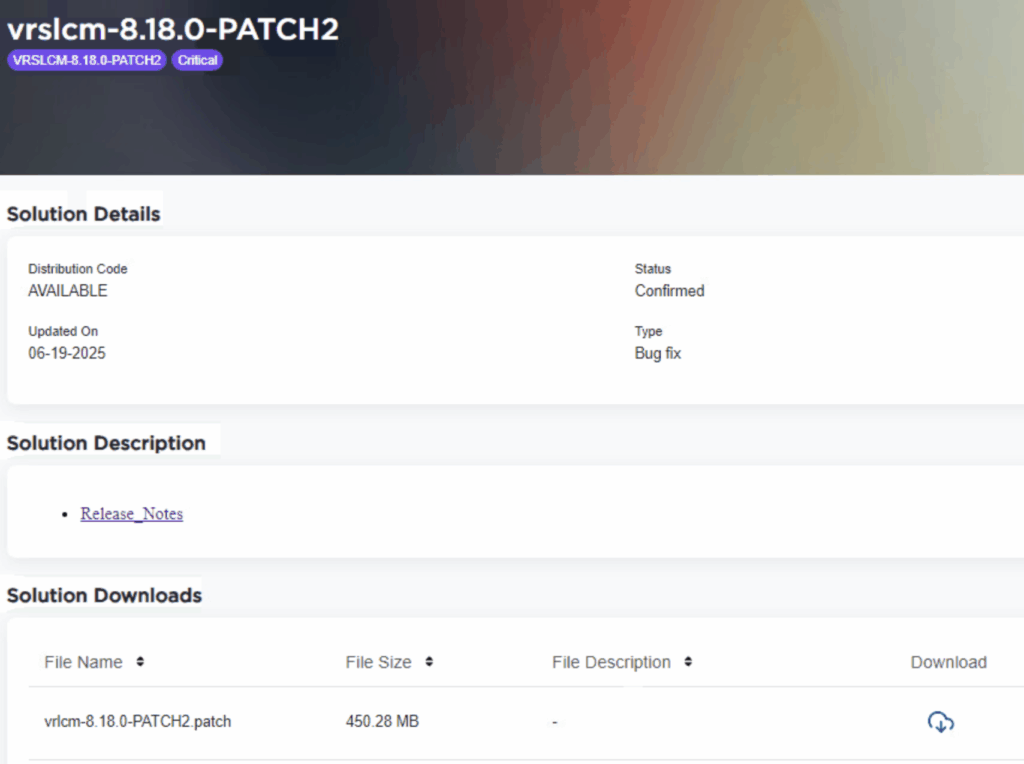
Patch 2 prepares Aria Suite Lifecycle Manager (ASLCM) for VMware Cloud Foundation 9.0 migrations. It does not deliver new features or hot-fixes, so only install it if VCF 9.0 (or the new VCF Operations appliance) is on your near-term roadmap. Why Patch 2 Matters Patch 2 updates the appliance-level services that let ASLCM recognize and orchestrate VCF 9.0 components (for example, Aria Operations 9.0). Without it, the 8.18 lifecycle UI cannot import or upgrade those binaries. If you are staying on VCF 5.x/8.x for a while, you can safely defer this patch. ...

June 20, 2025 · 3 min · Cosmin
Article cover image

Deploy a VCF 9 Instance in an new VCF fleet

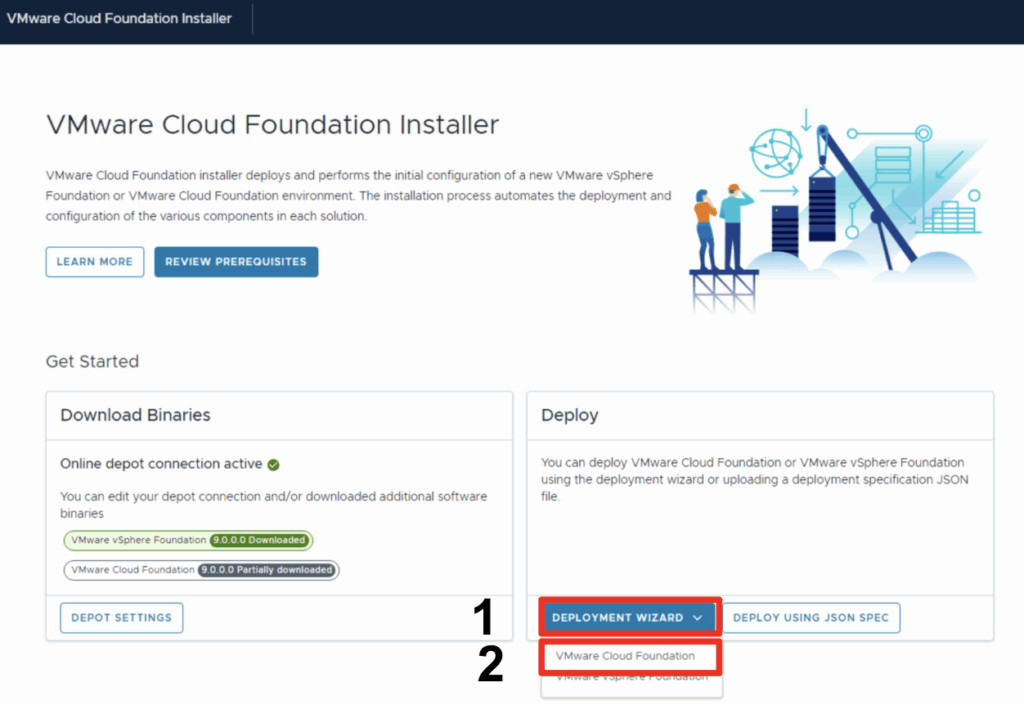
In this blog we will go over deploying a VCF 9 instance using existing components. Once logged on and binaries downloaded we can go through the Deployment wizard Click Deployment Wizard to bring up the menu Click on VMware Cloud Foundation Because I do not yet have any environments upgraded to the new fleet management this will be a new VCF Fleet. Through the deployment wizard we can select existing components and provide general information: ...

June 18, 2025 · 1 min · Cosmin
Article cover image

Configuring the VMware Cloud Foundation Installer appliance Step-by-step instructions

With the release of VCF 9 (Official What’s New blog can be found here) I wanted to get my lab environment upgraded so I can try out all of the new features. In my previous post we went over the deployment of the appliance. In this post we will be covering the configuration. Configure the VMware Cloud Foundation Installer appliance Once the appliance is deployed we can navigate to https://ip_address/ui or https://hostname/ui of the appliance. If everything is working properly we should be presented with a login screen. ...

June 18, 2025 · 2 min · Cosmin
Article cover image

Deploying the VMware Cloud Foundation Installer appliance Step-by-step instructions

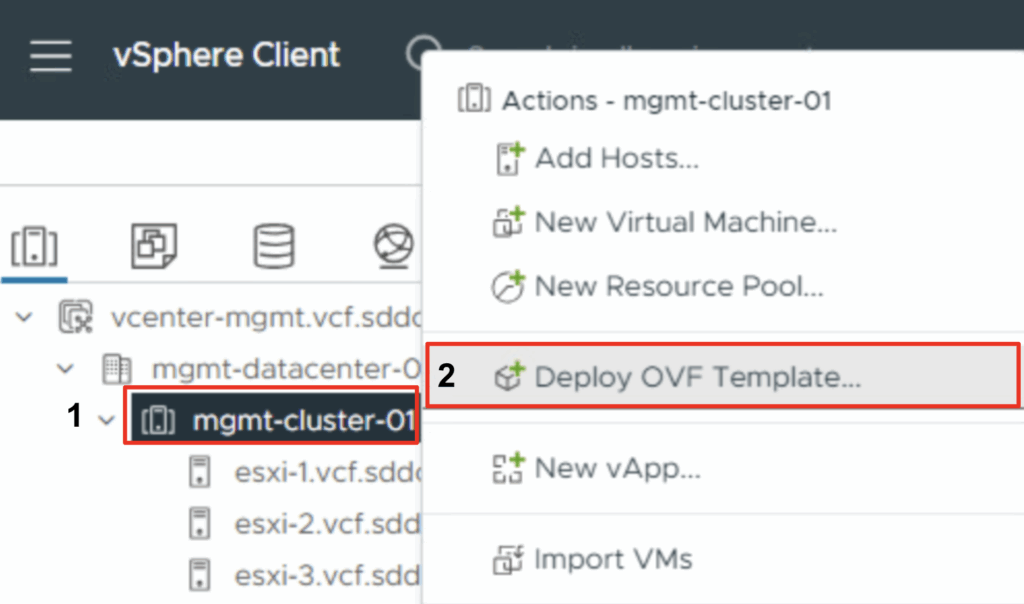
With the release of VCF 9 (Official What’s New blog can be found here) I wanted to get my lab environment upgraded so I can try out all of the new features. To get started we need to download the VMware Cloud Foundation Installer from the VMware Cloud Foundation 9.0.0.0 page found here. In this post we will cover only the deployment. The configuration is available in another post. Deploy the VMware Cloud Foundation Installer appliance Once the appliance is downloaded we need to get the ova deployed. ...

June 17, 2025 · 2 min · Cosmin