Article cover image

Replacing the VMware Identity Manager (vIDM) Certificate using VMware Aria Suite Lifecycle 8.18

Overview: Why and When to Replace the vIDM Certificate VMware Identity Manager (vIDM), also known as Workspace ONE Access, uses an SSL certificate to secure its web interface and establish trust with integrated VMware products (like vRealize/Aria Automation and Operations). Replacing this certificate is important in scenarios such as: Certificate Expiry: SSL certificates have expiration dates. You should replace the vIDM certificate before it expires to avoid service disruptions. An expired certificate can cause login failures and management tasks (like powering on vIDM or updating it) to fail. Self-Signed to CA-Signed: Out-of-the-box or lab deployments often use self-signed certificates, which trigger browser warnings and may not be trusted by other systems. Replacing a self-signed certificate with one signed by a trusted Certificate Authority (CA) eliminates these trust warnings and meets security compliance requirements. Security or Policy Requirements: Your organization might require using specific corporate CA certificates or updating certificates periodically for security. If the current certificate was compromised or if the domain name of the vIDM appliance changes, a replacement is needed. Integration Trust Issues: vIDM acts as the authentication provider for other VMware products. If those products do not trust vIDM’s certificate (e.g., after an update or if using a new CA), you should replace or re-trust the certificate to ensure seamless integration. In summary, proactively replace the vIDM certificate before it expires or whenever you need to switch to a certificate signed by a trusted CA. This ensures uninterrupted user access and integration with other services. Always schedule certificate updates during a maintenance window, as the process will restart services on vIDM and could temporarily disrupt logins. ...
May 8, 2025 · 22 min · Cosmin

Tracking Licensed Assets in VMware Aria Automation

I often find myself fielding questions about how to effectively manage and monitor licensing in VMware Aria Automation. Licensing is a critical piece of the puzzle when it comes to ensuring compliance, optimizing resource usage, and maintaining operational efficiency in your automation environment. Recently, I was asked about tracking licensed assets, and I’m excited to share a practical approach using the powerful vracli command-line interface (CLI), specifically the vracli license usage command. In this blog, I’ll walk you through how to leverage this tool to gain visibility into your licensed assets, why it matters, and some actionable insights for managing your Aria Automation deployment. ...

February 27, 2025 · 5 min · Cosmin
Article cover image

Deploying VMware Aria Operations for Logs in a VCF 5.2.1 Environment: Step-by-Step Guide

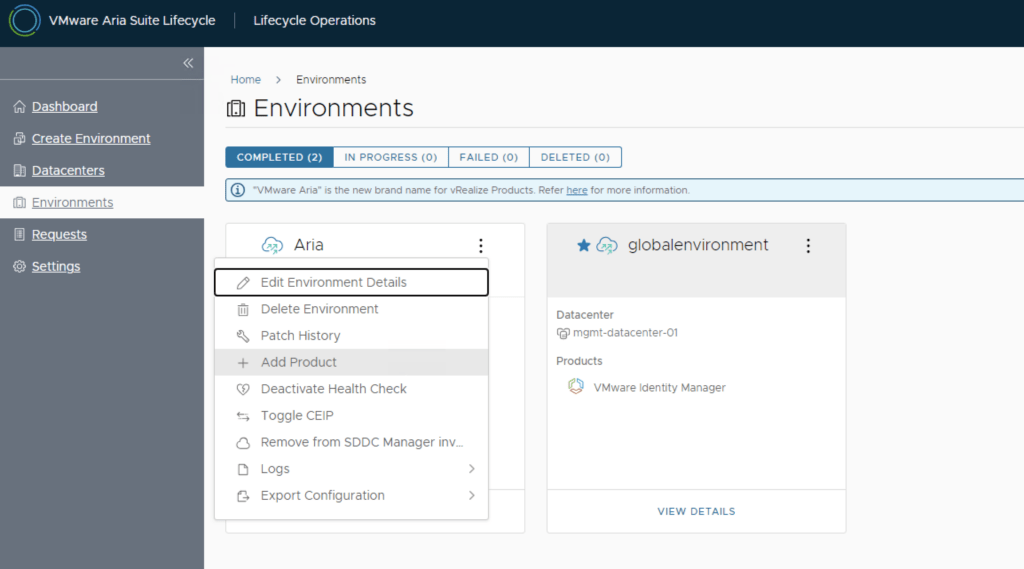
In a VMware Cloud Foundation (VCF) environment, managing logs effectively is crucial for monitoring, troubleshooting, and ensuring compliance. VMware Aria Operations for Logs (formerly vRealize Log Insight) provides centralized log collection, real-time analytics, and intelligent log correlation, making it an essential tool for proactive infrastructure management. This guide walks you through the step-by-step process of deploying VMware Aria Operations for Logs in a VCF 5.2.1 environment. Prerequisites VMware Cloud Foundation (VCF) 5.2.1: Confirm that your VCF environment is operational. Aria Lifecycle Manager (ALCM): Aria Lifecycle Manager 8.18 or compatible version installed and accessible. Network and DNS Configurations: Proper DNS and network settings to allow seamless communication among VMware components. VMware Identity Manager (vIDM): Configured and deployed for unified authentication across VMware products. If needed a guide can be found here. Step 1: Access Aria Lifecycle Manager Log in to the Aria Lifecycle Manager (ALCM) console with admin credentials. Ensure compatibility between ALCM and VCF 5.2.1 for a smooth deployment. Step 2: Add product in existing environment. Navigate to Lifecycle Operations. Under the existing environment click on the ellipsis. Click Add Product. ...

October 18, 2024 · 4 min · Cosmin

VMware Aria Operations Compliance Pack for HIPAA

I was trying to find some documentation around the metrics monitored by the VMware Aria Operations Compliance Pack for HIPAA. Since VMware is now including the management pack as a native solution as of vRealize Operations 8.1 I wasn’t able to find allot of documentation around it so I exported the symptoms monitored. Here is a list of the symptoms from version 8.10 HIPAA 164.312(c)(1) - Integrity - NTP time synchronization service is not configured on the host HIPAA 164.312(a)(1) - Access Control - Count of maximum failed login attempts is nto set HIPAA 164.312(c)(1) - Integrity - launchmenu feature is enabled HIPAA 164.312(c)(1) - Integrity - Unity taskbar feature is enabled HIPAA 164.312(c)(1) - Integrity - Shellaction is enabled HIPAA 164.312(c)(1) - Integrity - Independent nonpersistent disks are being used HIPAA 164.312(a)(1) - Access Control - Default setting for intra-VM TPS is incorrect HIPAA 164.312(c)(1) - Integrity - NTP Server is not configured to startup with the host HIPAA 164.312(a)(1) - Access Control - Dvfilter network APIs is nto configured to prevent unintended use HIPAA 164.312(a)(1) - Access Control - HGFS file transfers are enabled HIPAA 164.312(b) - Audit Control - Persistent logging is not configured for ESXi host HIPAA 164.312(c)(1) - Integrity - Toprequest feature is enabled HIPAA 164.312(b) - Audit Control - Remote logging for ESXi hosts is not configured HIPAA 164.312(c)(1) - Integrity - PCI pass through device is configured on the virtual machine HIPAA 164.312(c)(1) - Integrity - Bios Boot Specification feature is enabled HIPAA 164.312(a)(1) - Access Control - Timeout to automatically terminate idle sessions is not configured HIPAA 164.312(a)(1) - Access Control - Access to VM console is not controlled via VNC protocol HIPAA 164.312(a)(1) - Access Control - VIX messages are enabled on the VM HIPAA 164.312(c)(1) - Integrity - Protocolhandler feature is enabled HIPAA 164.312(a)(1) - Access Control - Copy/paste operations are enabled HIPAA 164.312(c)(1) - Integrity - Tray icon feature is enabled HIPAA 164.312(a)(1) - Access Control - GUI Copy/paste operations are enabled HIPAA 164.312(c)(1) - Integrity - version get feature is enabled HIPAA 164.312(c)(1) - Integrity - Informational messages from the VM to the VMX file are not limited HIPAA 164.312(a)(1) - Access Control - Timeout value for DCUI is not configured HIPAA 164.312(a)(1) - Access Control - Guests can recieve host information HIPAA 164.312(c)(1) - Integrity - Users and processes without privileges can remove, connect and modify devices HIPAA 164.312(c)(1) - Integrity - NTP time synchronization server is not configured HIPAA 164.312(c)(1) - Integrity - Unity active feature is enabled HIPAA 164.312(c)(1) - Integrity - Autologon feature is enabled HIPAA 164.312(a)(1) - Access Control - drag-n-drop - Copy/paste operations are enabled HIPAA 164.312(c)(1) - Integrity - Intra VM Transparent Page Sharing is Enabled HIPAA 164.312(c)(1) - Integrity - GetCreds feature is enabled HIPAA 164.312(a)(1) - Access Control - Time after which a locked account is automatically unlocked is not configured HIPAA 164.312(c)(1) - Integrity - Versionset feature is enabled HIPAA 164.312(a)(1) - Access Control - Auto install of tools is enabled HIPAA 164.312(a)(1) - Access Control - Access to DCUI is not set to allow trusted users to override lockdown mode HIPAA 164.312(a)(1) - Access Control - Access to VMs are not controlled through dvfilter network APIs HIPAA 164.312(a)(1) - Access Control - Copy/paste operations are enabled HIPAA 164.312(a)(1) - Access Control - Managed Object Browser (MOB) is enabled HIPAA 164.312(c)(1) - Integrity - Trash folder state is enabled HIPAA 164.312(c)(1) - Integrity - Unity feature is enabled HIPAA 164.312(a)(1) - Access Control - Timeout is not set for the ESXi Shell and SSH services HIPAA 164.312(c)(1) - Integrity - Image Profile and VIB Acceptance Levels are not configured to desired level HIPAA 164.312(c)(1) - Integrity - Firewall is not configured for NTP service HIPAA 164.312(c)(1) - Integrity - Unity push feature is enabled HIPAA 164.312(c)(1) - Integrity - Users and processes without privileges can connect devices HIPAA 164.312(c)(1) - Integrity - Memsfss feature is enabled HIPAA 164.312(c)(1) - Integrity - Unity Interlock is enabled HIPAA 164.312(c)(1) - Integrity - Unity window contents is enabled HIPAA 164.312(e)(1) - Transmission Security - NFC on the vCenter is not configured for SSL HIPAA 164.312(e)(1) - Transmission Security - Restrict port-level configuration overrides on VDS HIPAA 164.312(c)(1) - Integrity - Virtual disk shrinking wiper is enabled HIPAA 164.312(c)(1) - Integrity - Virtual disk shrinking is enabled HIPAA 164.312(e)(1) - Transmission Security - The Forged Transmits policy is not set to reject HIPAA 164.312(e)(1) - Transmission Security - MAC Address Changes policy is set to reject HIPAA 164.312(e)(1) - Transmission Security - SNMP Server is running on the host HIPAA 164.312(e)(1) - Transmission Security - The Promiscuous Mode policy is not set to reject HIPAA 164.312(d) - Person or Entity Authentication - Active directory is not used for local user authentication HIPAA 164.312(e)(1) - Transmission Security - Host firewall is not configured to restrict access HIPAA 164.312(e)(1) - Transmission Security - BPDU filter is not enabled on the host HIPAA 164.312(e)(1) - Transmission Security - The MAC Address Changes policy is not set to reject HIPAA 164.312(d) - Person or Entity Authentication - Password policy for password complexity is not set HIPAA 164.312(e)(1) - Transmission Security - VDS network healthcheck for Teaming Health Check is enabled HIPAA 164.312(d) - Person or Entity Authentication - Bidirection CHAP auhtentication is not enabled HIPAA 164.312(e)(1) - Transmission Security - Forged Transmits policy is set to reject HIPAA 164.312(e)(1) - Transmission Security - Promiscuous Mode policy is configured to reject

March 30, 2023 · 5 min · Cosmin

A Step-by-Step Guide to Convert Native Cloud Virtual Machines to On-Prem vSphere with VMware Converter

Migrating virtual machines (VMs) from a cloud environment to an on-premises VMware vSphere infrastructure can be a daunting task. However, with the right tools and processes in place, it can be a seamless and efficient process. One such tool is the VMware Converter, which enables users to convert native cloud VMs\physical servers to vSphere machines. In this blog post, we will discuss the benefits and challenges of converting cloud VMs and provide a step-by-step guide for using VMware Converter to achieve this goal. ...

March 20, 2023 · 4 min · Cosmin