Replacing the AR Corfu certificate in NSX

In this blog we will go over replacing the Corfu certificate in NSX. In this example I will be using the UI to generate the self signed certificate and then an API call to replace the certificate. In my case the AR Corfu certificate has already expired In the top menu bar I went to Generate -> Generate Self Signed Certificate Next I had to grab the new certificate ID ...
July 7, 2023 · 2 min · Cosmin

Certificate delete failed: Certificate cannot be deleted because it is used by 1 MP node

I was recently trying to replace some service certificates and I accidentally associated the certificate with the wrong service. When trying to delete the certificate I was presented with an error “Certificate delete failed: Certificate cannot be deleted because it is used by 1 MP node” The first step I did was try to figure out what service is associated with the certificate. For that I leveraged the instructions in KB 75277. Performing a GET /api/v1/trust-management/certificates/{cert-id} I was able to identify that CBM_API service was using the certificate. ...

July 7, 2023 · 1 min · Cosmin

Replacing the Corfu API certificate in NSX

In this blog we will go over replacing the Corfu API certificate in NSX. In this example I will be using the UI to generate the self signed certificate and then an API call to replace the certificate. In my case the Corfu API certificate has already expired In the top menu bar I went to Generate -> Generate Self Signed Certificate Next I had to grab the new certificate ID ...

July 7, 2023 · 2 min · Cosmin

Replacing the LocalManager certificate in NSX

In this blog we will go over replacing the LocalManager certificate in NSX. In this example I will be using the UI to generate the self signed certificate and then an API call to replace the certificate. In my case the LocalManager certificate has already expired In the top menu bar I went to Generate -> Generate Self Signed Certificate Next I had to grab the new certificate ID ...

July 6, 2023 · 2 min · Cosmin

Simplifying NSX Edge Removal in VMware Cloud Foundation (VCF) Environment

VMware Cloud Foundation (VCF) has revolutionized data center virtualization by seamlessly integrating compute, storage, and networking components. In a VCF environment, the NSX platform provides crucial software-defined networking capabilities. At times, removing NSX edges becomes necessary due to infrastructure changes, optimization efforts, or other reasons. To simplify this process, VMware has introduced the NSX Edge Removal Tool. In this blog post, we will explore how this tool can streamline the removal of NSX edges in a VCF environment while preserving dependencies. ...

July 5, 2023 · 3 min · Cosmin
Article cover image

How to forcibly delete an NSX-T 3 Segment

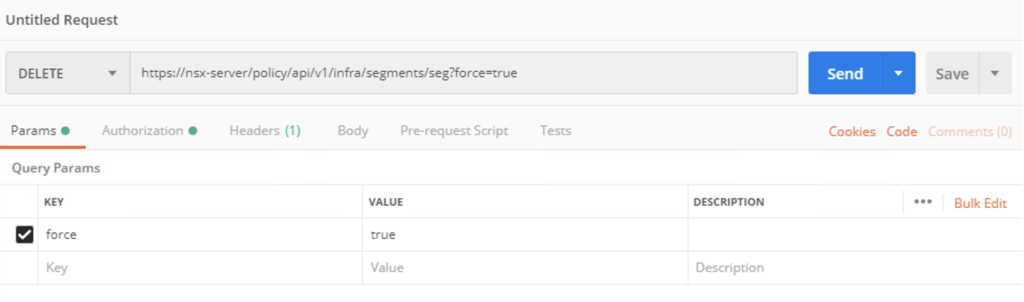
I recently ran in to a problem where i couldnt delete an NSX segment so i went exploring the API. The API guide can be found here The method used is delete policy/api/v1/infra/segments/{segment-id}?force=true It would look like this in Postman: To list the segments we can use a get request towards /policy/api/v1/infra/segments/

March 3, 2023 · 1 min · Cosmin

Removing NSX stale packages from ESXi host

I recently ran in to a problem where i wanted to perform a clean configuration of one of my ESXi hosts from an NSX perspective, however i ran in to a problem where NSX was reporting that the packages are already installed. To fix the issue i had to run the following to list the packages installed: esxcli software vib list | grep -i nsx Once i had the list all i had to do is uninstall them using: ...

March 3, 2023 · 1 min · Cosmin
Article cover image

Configure NSX-T to use vIDM as authentication

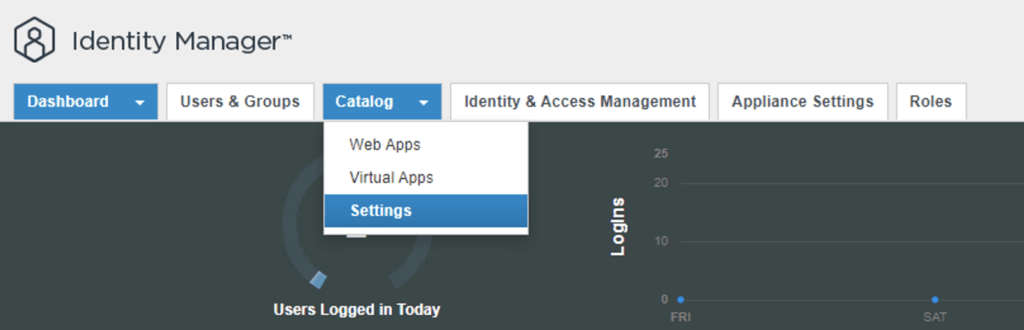
I needed to create a few additional accounts in NSX-T for outside sources. Instead of creating individual accounts i wanted to use the existing ones from AD. To get started we need to get the certificate from the vIDM server. Log on to the vIDM server as root and run the following: openssl1 s_client -connect <FQDN of vIDM host>:443 < /dev/null 2> /dev/null | openssl x509 -sha256 -fingerprint -noout -in /dev/stdin Next we need to create the OAuth client ID in vIDM. Log in to the vIDM UI using the url SAAS/admin/app/page#!/dashboard as admin and Navigate to Catalog -> Settings ...

March 3, 2023 · 2 min · Cosmin

Extracting SSL Thumbprint

I recently ran in to an issue where i had to re-register my NSX server with vIDM. The ask was to extract the Thumbprint from vIDM. The command i ran to extract it was: echo -n | openssl s_client -connect hostname:443 2>/dev/null | openssl x509 -noout -fingerprint -sha256 This can be used across multiple products where the Thumbprint needs to be extracted

October 10, 2020 · 1 min · Cosmin
Article cover image

NSX 2.5.0 to NSX 2.5.1 fails with error “restart service install-upgrade” on the NSX Manager.

I`ve recently ran through a problem when trying to upgrade NSX-T from version 2.5.0 to 2.5.1. When using the Upgrade function within the UI i was getting the following error: This page is only available on the NSX Manager where Upgrade Coordinator is running. To configure the service, run the command “restart service install-upgrade” on the NSX Manager. White checking the status of the service the service seemed to be running with no issues. I also checked the release notes for a couple of releases back and i found a similar issue in the release notes for the 2.3 release https://docs.vmware.com/en/VMware-NSX-T-Data-Center/2.3/rn/VMware-NSX-T-Data-Center-23-Release-Notes.html ...

July 16, 2020 · 3 min · Cosmin